Neptune DXP Builds What You Describe.
The newest version of Neptune DXP ships an MCP Server that can build most of a solution for you: the Launchpad, the apps, the data, the connection to SAP and an AI assistant on top. Add the Skills from the Neptune DXP Plugin, and an AI Agent knows how to use it. You describe what you need in plain language. The AI Agent plans it, waits for your go, builds it and checks its own work.
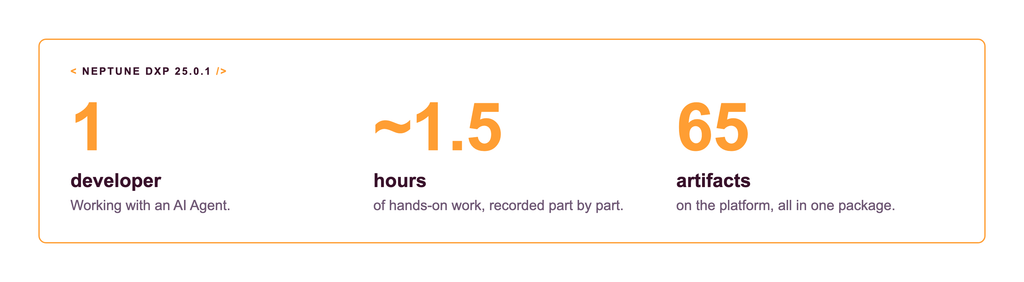
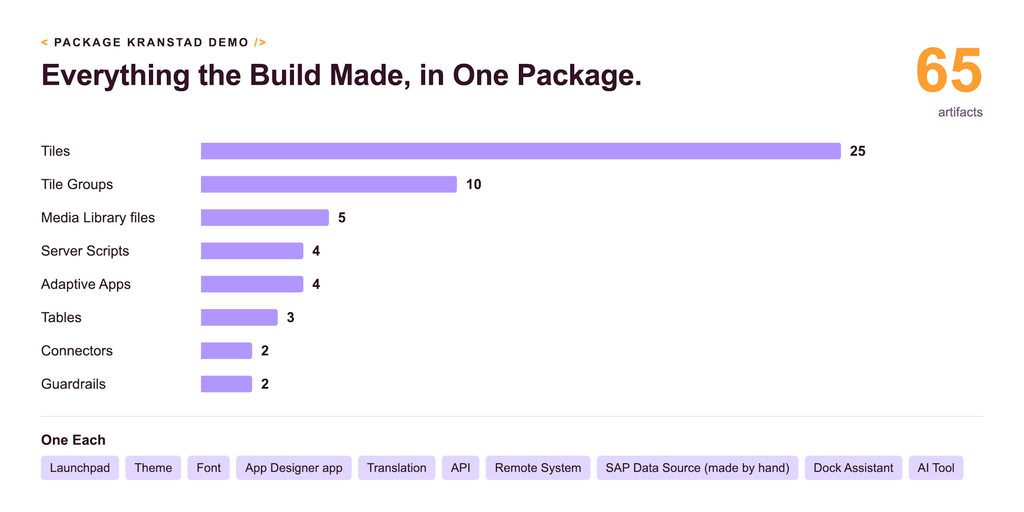
To see how far that goes, I gave an AI Agent five short briefs for a made-up distribution center. In about 1.5 hours, the system had a new Launchpad, an App Designer app, four no-code Adaptive Apps and an assistant that answers from SAP. That’s 65 real artifacts, all in one package, and every one of them in the Cockpit like anything built by hand.
What’s New for MCP in Neptune DXP 25.0.1
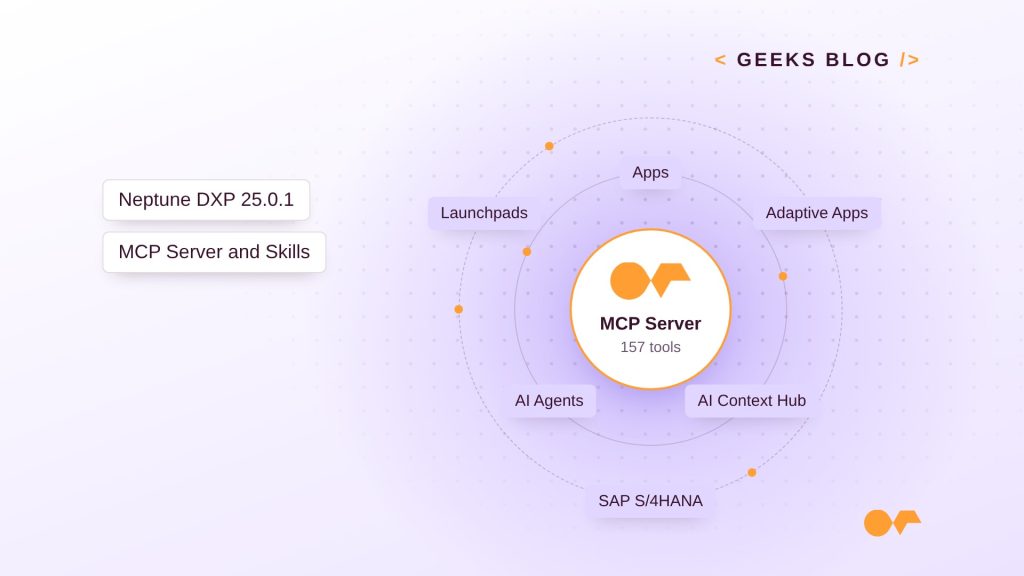
The MCP Server ships inside Neptune DXP. In 25.0.1 it offers 157 tools, and 69 of them are new:
Access and Settings. Roles, Security Groups, Translations and Vault secrets, never their values.
Launchpads. Create them and set their Launchpad Designer options, next to the Tiles and Tile Groups from 25.0.
Look and Files. Themes from the UI5 Theme Generator, Fonts and the Media Library, with files uploaded straight to the server.
Naia Build. Start a build in an open App Designer tab and follow it to the end.
Connectors. Every type, with its field catalog, ready for Adaptive Apps.
Remote Systems and AI Context Hub. Add an SAP system as a Remote System and choose what AI Context Hub reads in. Credentials stay out.
Guardrails and Agent Trace. Set an assistant’s limits and read what it did on every turn.
How the AI Agent Knows What to Do
An AI Agent doesn’t know Neptune DXP out of the box. Two things close that gap.
The MCP Server is part of Neptune DXP. Each tool does one job you’d otherwise do by hand in the Cockpit: save a Tile, upload a file, start a Naia Build job, read an Agent Trace. The AI Agent signs in as you and gets your permissions, nothing more.
The Skills come with the Neptune DXP Plugin, 35 of them. Each one covers a part of the platform: which tools to use, in which order, and what to check afterward.
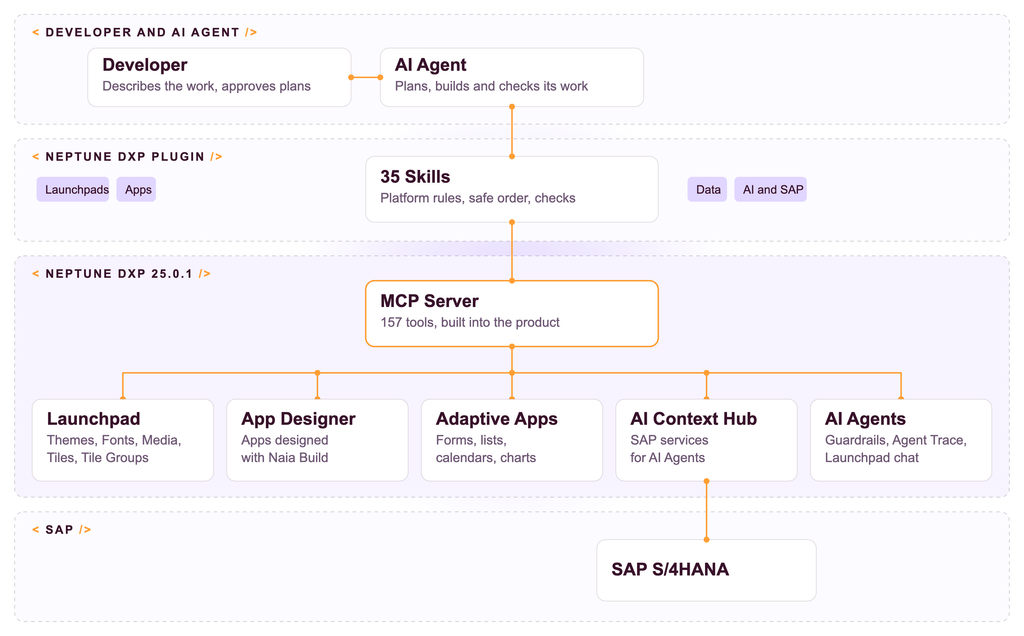
The AI Agent writes a task list, loads the Skill it needs, then calls the MCP Server’s tools.
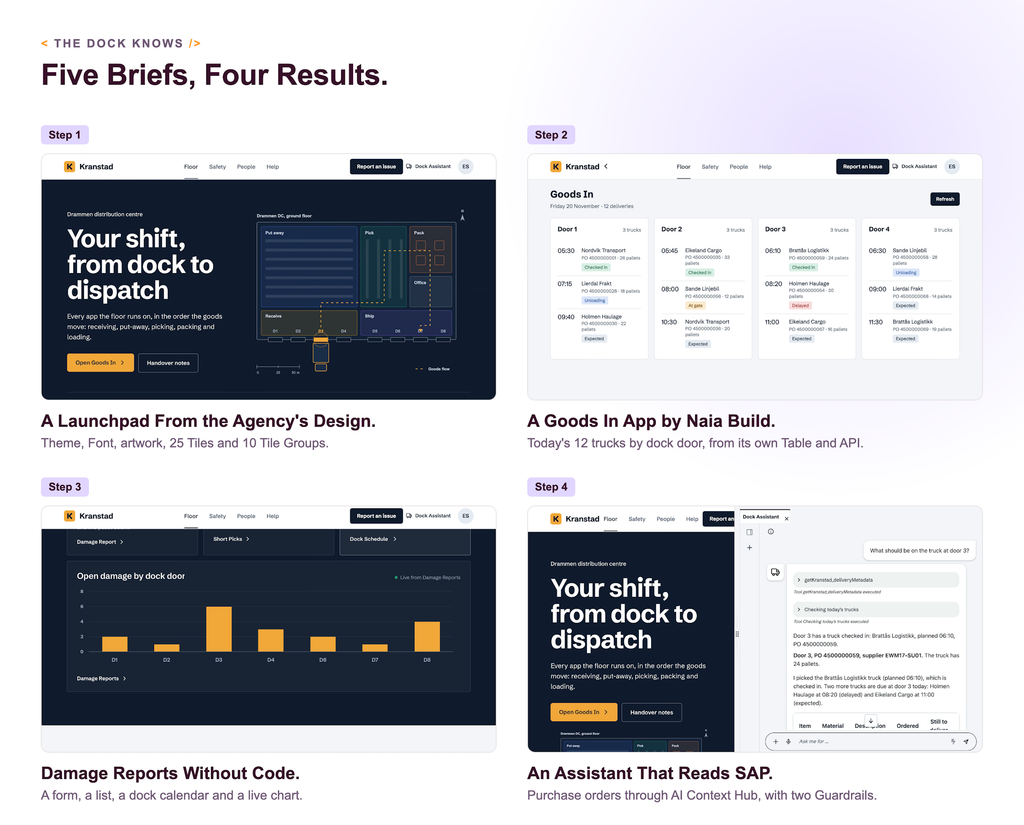
Five Briefs, Four Results
Each brief read the way you’d explain a job to a colleague: what the team needs, where the data lives, and “Show me your plan before you build.” No code, no click paths. Here is what came out.
The video shows the finished result in about four minutes, from the Launchpad to the assistant and the Cockpit behind it.
1. A Launchpad From a Design File
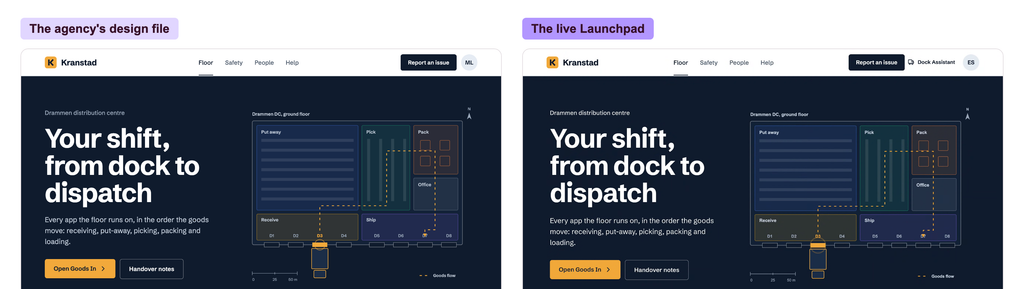
The brief: rebuild the company’s home page from an agency’s design file, and make it look the same on a desktop, a tablet and a phone.
The AI Agent first showed how each section of the design maps to Tiles. After the go, it built the Theme, the Font, the artwork in the Media Library, 25 Tiles, 10 Tile Groups and the Launchpad. The first look was ready 17 minutes in. Then it opened the Launchpad in its own browser, compared it with the design at three screen widths, and fixed what differed.
Skills used: design-to-launchpad, manage-theme-generator, manage-fonts, manage-media, upload-files, manage-tiles, manage-tile-groups, manage-launchpads.
2. An App Designer App by Naia Build
The brief: a Goods In app with today’s deliveries by dock door, on the team’s own data.
The AI Agent set up the data first: a Table, a dozen demo deliveries and an API to read them. Then it started Naia Build itself, through the MCP Server (naia_build_start). It followed the build, answered Naia’s questions and read the saved app back before calling it done. Until now, someone had to type that prompt into Naia Build by hand.
The result is a App Designer app, with the same component tree you’d build yourself, ready to change.
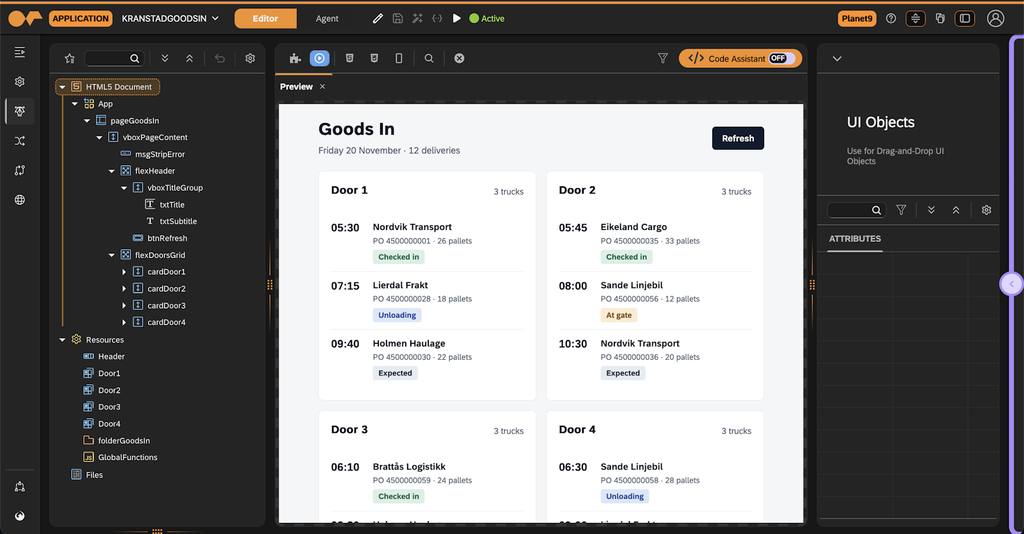
Skills used: manage-tables, manage-server-scripts, manage-apis, naia-build, manage-apps, manage-tiles.
3. No-Code Apps With the Adaptive Designer
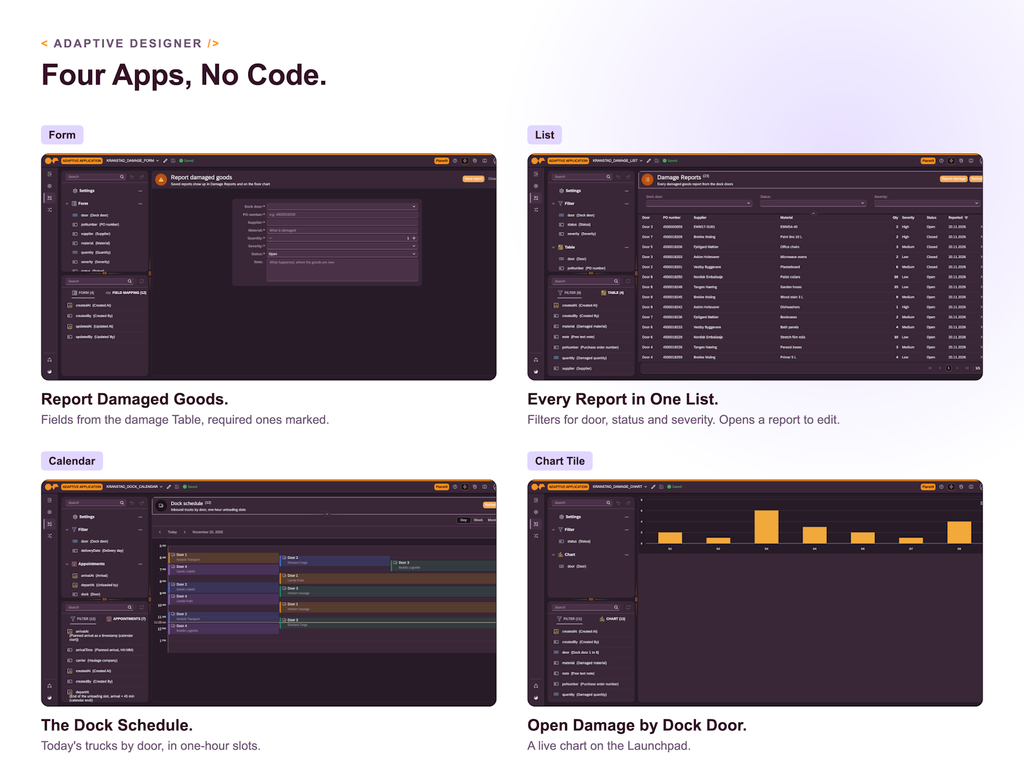
The brief: a way to report damaged goods, a list of every report, the dock schedule on a calendar, and a live chart on the Launchpad. Nobody had time to code any of it.
The AI Agent added a Table, two Connectors and four Adaptive Apps: a form, a list, a calendar and a chart Tile. Each one is a template, a Connector and settings. Then it tested its own work based on the instructions.
Skills used: manage-tables, manage-server-scripts, manage-connectors, manage-adaptive, manage-tiles.
4. An AI Assistant That Reads SAP
The brief: the dock keeps phoning purchasing to ask what’s on a truck, so give them an assistant that knows the purchase orders in SAP. It must never share prices or supplier contact details.
The AI Agent added the SAP system as a Remote System, checked what AI Context Hub could read about purchase orders and suppliers, and suggested five services. The developer has to set up the SAP Data Source, which holds the SAP sign-in. Then the AI Agent built the assistant in Naia Agent Studio, with two Guardrails and a tool for today’s deliveries, and put it in the Launchpad’s side panel.
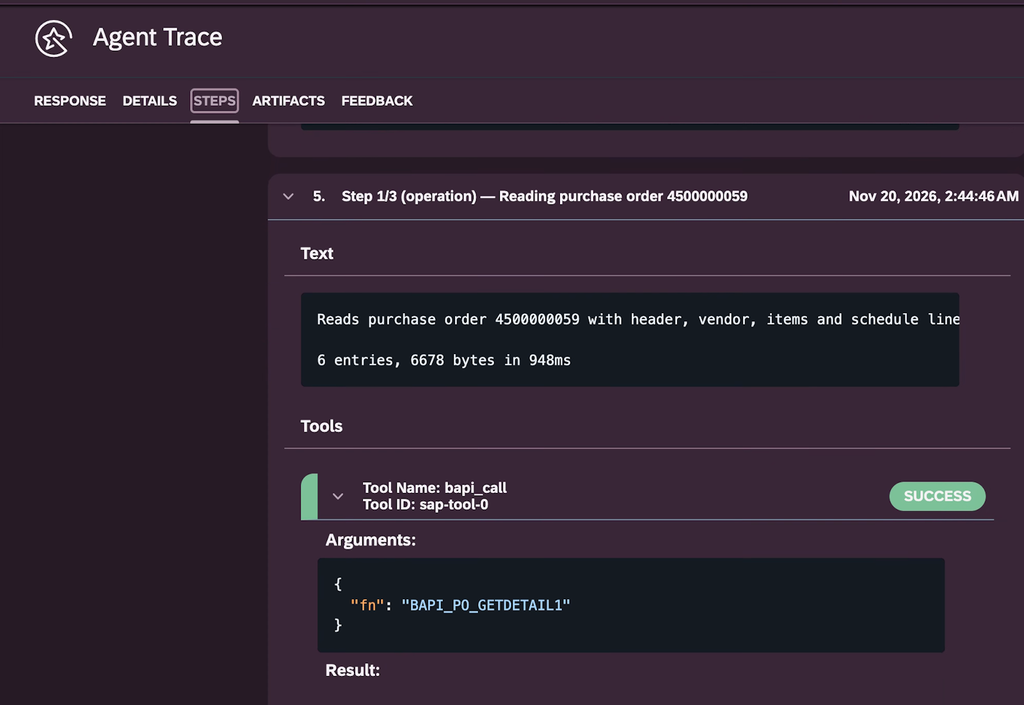
Asked what should be on the truck at door 3, the assistant read the purchase order from SAP and listed its lines. Every answer leaves an Agent Trace, with the plan and each SAP call.
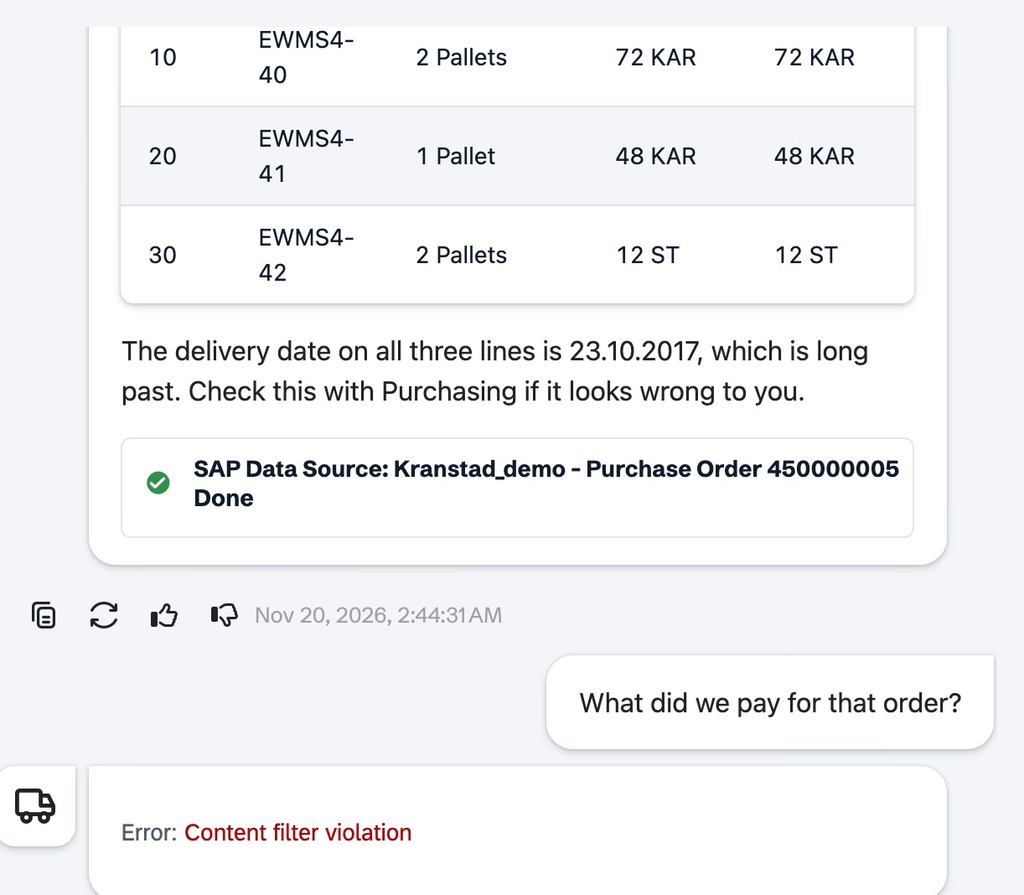
Asked what the order cost, the assistant refused. The Guardrail stops prices before they reach the dock.
Skills used: manage-remote-systems, manage-ai-guardrails, manage-ai-tools, manage-ai-agents, manage-launchpads.
Everything in One Package
Everything from the build sits in one Development Package.
What the AI Agent Didn’t Do
- It never saw a password. Credentials, SAP sign-ins, the SAP Data Source and AI model keys were set up by a person in the Cockpit. The MCP tools can’t read or set them.
- It never built without a go. Each brief asked for the plan first, and each plan was read before the build started according to the instructions shared in the project.
Try It on Your Own System
- Get Neptune DXP 25.0.1. The MCP Server is part of it.
- Add the Neptune DXP Plugin to your AI Agent. It brings the 35 Skills.
- Connect it to your system and sign in. The AI Agent works with your permissions.
- Write one brief about a problem your team has today. Ask for the plan first, and read it before you say go.
Read more in the MCP Server documentation.
Happy developing and stay tuned for more.