Repetitive Manual Data Entry: Why the Same Information Gets Typed Twice.
Most data in SAP has been written down at least once before it gets there. That second time is where the execution gap grows.
A delivery note signed on a clipboard. An inspection result noted on a printed checklist. A counted quantity scribbled on a pallet label. Later, someone sits down and types it all into SAP. Manual data entry in SAP is so normal in many operations that nobody counts it anymore.
In the first post of this series, we looked at too many screens and clicks. This post looks at what happens when the screen is so far from the work that people stop using it in the moment and write things down instead.
The Problem: Data Is Captured Twice, and Owned by Neither.
Frontline work happens at the dock, the machine, the shelf and the customer site. SAP usually lives on a desktop in an office, or behind a transaction that doesn’t fit a handheld device.
So the work splits in two. First, people capture the data where it happens: on paper, in a spreadsheet, in a photo on their own phone. Then someone types it into SAP. Sometimes the same person at the end of the shift. Sometimes a dedicated clerk who never saw the work.
Each handover adds time. Each re-typed value is a chance to get it wrong. And the people who know what actually happened are rarely the people who enter it.
A Practical Example: Goods Receipt at the Dock.
A truck arrives at the warehouse. The operator checks the delivery against the paper delivery note, counts the cartons, notes two damaged items and a short delivery on one line, and signs.
The paper goes into a tray. Two hours later, a receiving clerk picks it up, finds the purchase order in SAP and types in each line: material, quantity, batch, storage location, the shortage and the damage. The handwriting on line seven is hard to read. The clerk makes a best guess.
Meanwhile, the goods sit on the dock. Until the receipt is posted, SAP doesn’t know the stock is there. Production can’t plan with it, and the shortage doesn’t reach purchasing until the next day.
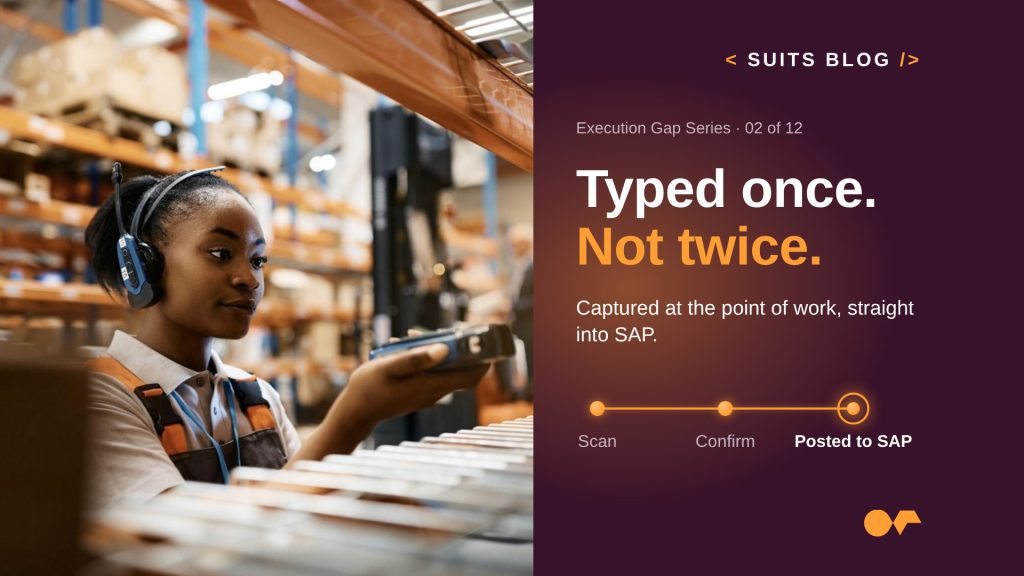
Now picture the same receipt captured once. The operator scans the delivery, sees the purchase order lines already filled in from SAP, confirms the quantities, flags the shortage, takes a photo of the damage and posts. The stock is available in SAP before the truck leaves.
The Impact: Late, Wrong and Expensive.
Typing data twice costs more than the minutes it takes:
- Duplicated effort. Someone does the work, then someone records it. You pay for both.
- Errors that travel. A wrong quantity in a goods receipt becomes a wrong stock level, a wrong plan and a wrong invoice match.
- Late decisions. Stock, quality results and confirmations reach SAP hours or days after the fact. Every planner downstream works with old information.
- Lost detail. The photo, the note, the “it was already damaged” never make it into the system. When a dispute comes up, nobody can prove what happened.
- Nothing for AI to act on. An AI agent can’t flag a supplier problem or trigger a follow-up if the data sits on paper in a tray. Data captured once, at the source, is what makes AI useful in operations.
How Neptune Closes the Gap.
The fix is not a faster typist. It is capturing data once, where the work happens, straight into SAP.
With Neptune, you build Business Applications that bring the SAP process to the point of work:
- Prefilled from SAP. Purchase orders, work orders and inspection plans come from SAP, so people confirm and correct instead of typing from scratch.
- Scan instead of type. Barcodes, QR codes and RFID capture materials, batches, locations and assets in one step.
- Photos and notes in context. Evidence is attached to the right SAP record, not saved on someone’s phone.
- Online or offline. Data is captured even without a connection and synced to SAP when the device is back online.
- Native on SAP. Entries go straight into SAP through native SAP integration, with SAP’s validations, rules and authorizations applied at the moment of capture.
Customers start with one form or one paper process and scale from there. Asia Express Food took its first warehouse application from idea to production in four days on SAP ECC. Johnson & Johnson scaled an inventory management application to 16 sites and 130,000 users and cut SAP supply chain processing time by 40%. In Warehouse Operations, customers see up to 30% faster inventory counting.
The Metrics It Moves.
Capturing data once shows up in three of the six outcome areas from the series introduction:
| Outcome area | KPIs to baseline |
|---|---|
| Increase workforce productivity | Manual administration time · Task completion time |
| Improve accuracy and process quality | Transaction error rate · First-time-right rate · Rework rate |
| Increase operational responsiveness | Time from event to action |
How to Build the Business Case.
Start with one paper form. Every operation has one.
- Find the double entry. List the forms, checklists and spreadsheets that end up being typed into SAP. Pick the one with the highest volume.
- Measure the second step. Time how long it takes to type one form into SAP, and how long the data waits between capture and posting.
- Count the corrections. Look at how many entries get reversed, corrected or disputed in a month, and how long each fix takes.
- Do the math. Re-entry time per form, multiplied by forms per day and working days. Then add the cost of corrections and the cost of decisions made on late data.
An illustrative example: a site receives 80 deliveries a day, and each one takes three minutes to type into SAP from paper. That is four hours a day, or about 880 hours over 220 working days, before you count a single correction.
The Question to Ask Your Teams.
Which information do you write down first and type into SAP later?
Every answer is a place where your data is late, and a place where your execution gap is easy to close. Next in this series: information scattered across systems, and why people spend their day looking for what they need.